
HACCP
HACCP dashboard
Visible from Shift Lead up, if your role may read HACCP — that is, to everyone who gets the push on HACCP deviations. Only team leads can justify missing entries.
The HACCP dashboard gives you a complete overview of your venue's HACCP documentation — including the audit score, entries, warnings and missing checks.
How to open the dashboard
- Settings › Tasks & HACCP › HACCP Audit › HACCP dashboard, or
- directly via
/app/haccp-dashboard, or - from a HACCP deviation: via Open in HACCP dashboard → in the deviation email, or by tapping the push notification (see Notifications). The day of the deviation, the location and the "Warnings" filter are then already set.
Layout
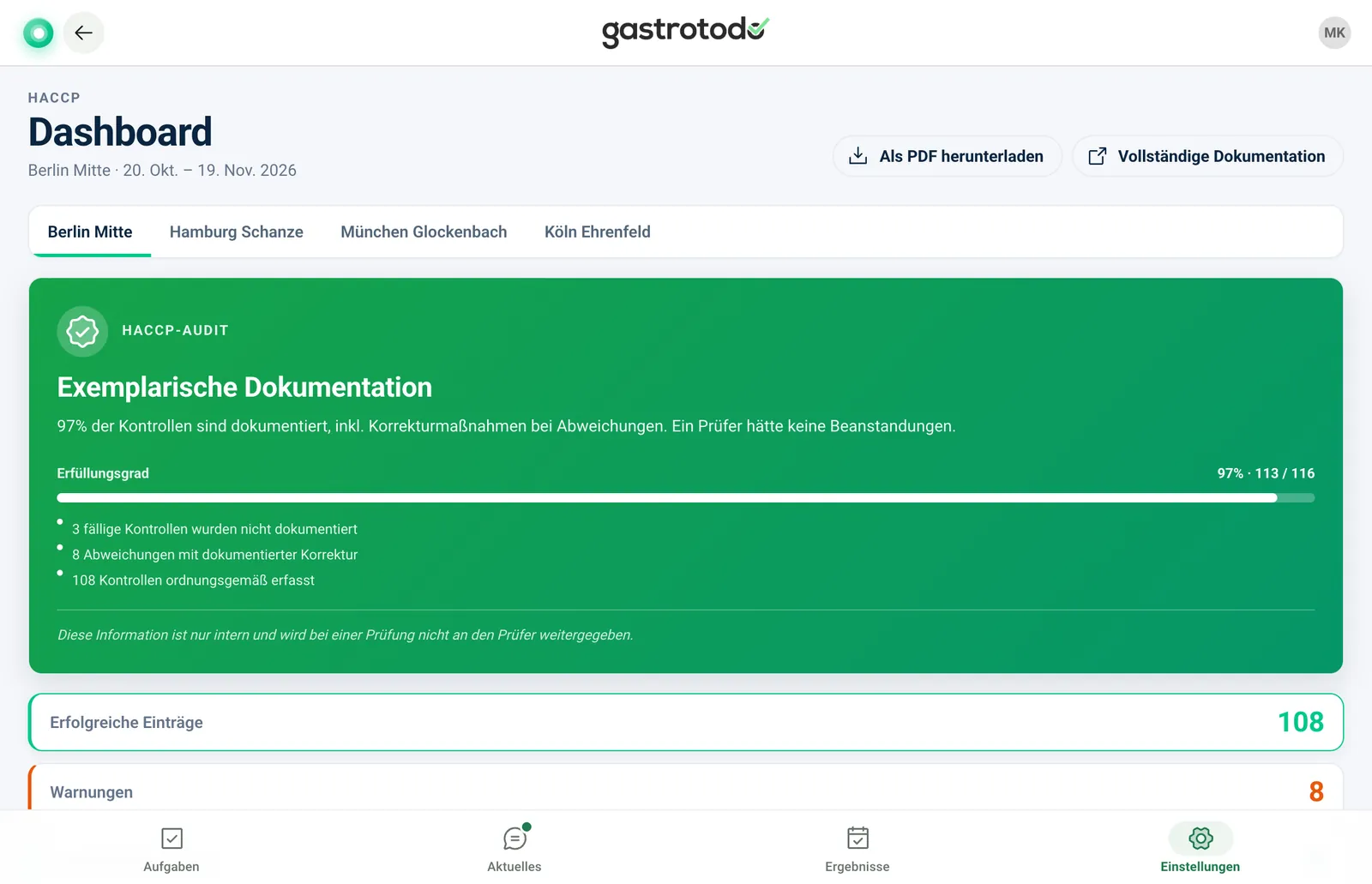
HACCP audit
In the top left you'll find the audit card — an automatic verdict on how an inspector would judge your documentation. There are five grades:
- Exemplary documentation (green) — from 95% completion rate, all warnings with a corrective action
- Solid documentation (gold) — 80–95%
- Needs improvement (orange) — 60–80%, or any open warnings without a corrective action
- Insufficiently documented (red) — below 60%
- Documentation missing (red) — no HACCP tasks in the system
The audit card also shows the completion rate as a progress bar plus concrete findings (e.g. "3 warnings without corrective action").
This information is internal only and is not shared with an inspector during a check.
KPI strip
To the right of the audit card you can see the key figures:
- Successful entries — checks that were recorded properly
- Warnings — measurements outside the limits
- Corrective actions — entries with a documented correction
- Missing entries — due checks without documentation
- Justified absences — missed checks with a complete justification
Filters
The five filter chips let you choose which entries appear in the list. Each chip shows the current count.
Entry list
Each entry shows:
- Task name and timestamp
- Measured value (colour-coded: green = OK, orange = warning)
- Expected range
- Corrective action (if any)
- Name of the person who took the reading
Justifying missing entries
As a team lead, tap a missing entry to record a structured justification:
- Reason for the gap — e.g. staff shortage, technical fault
- Risk assessment — was the product still safe?
- Immediate action — e.g. re-measured, product discarded
- Signature — digital signature to confirm
Justified absences disappear from the "Missing entries" list and count as documented in the audit. They appear under the "Justified absences" filter and are shown in the printable HACCP documentation right next to the relevant task.
What doesn't count as missing
- Rest days: occurrences on days entered as a rest day in the calendar don't show up under "Missing entries" and don't count against the completion rate. Anything that was done on a rest day anyway stays visible as an entry.
- Occurrences reported as not needed: if someone reported a HACCP task as "not needed" (e.g. incoming goods check without a delivery), the occurrence is closed — it isn't missing and counts towards the completion rate like a documented one. It doesn't appear in the entry list, because there's no reading; you'll find the reason in the HACCP documentation. How to report it: Completing HACCP tasks.
Location and time range
- Tabs at the top: switch between locations
- Quick filter: 7 days / 30 days / 90 days
- Custom: pick your own start and end date
Link to the documentation
In the top right you'll find two buttons:
- Download as PDF — generates the printable log as a PDF.
- Full documentation — opens the printable log in a new tab.
Tip
Take a look at the dashboard once a week. If the audit score drops below "Solid", talk to the people affected — often they just don't realise something is missing.